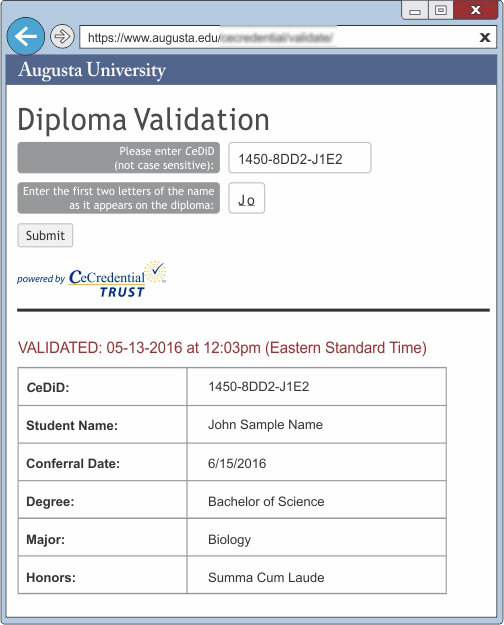
The credential can be validated online one of two ways:
- DIPLOMA VALIDATION PAGE: To ensure the credential information is valid, a CeDiploma or CeCertificate should
be validated through the university's website using a 12-digit Certified Electronic Document ID (CeDiD*), along with the first
two letters of the name as it appears on the credential.
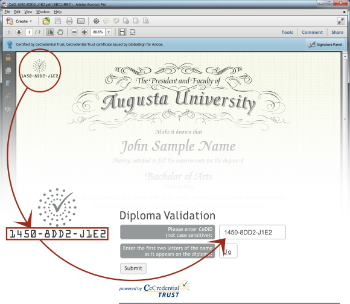
- DIGITAL SIGNATURE: Each CeDiploma and CeCertificate is digitally signed by CeCredential Trust. When
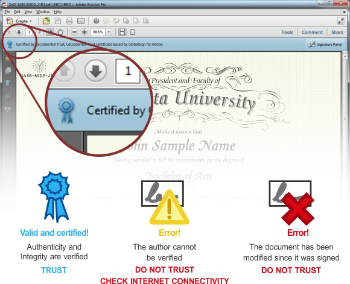
the document is viewed through Adobe Reader® or Acrobat® versions 9.0 or higher, it
will reveal that a Digital Signature has been applied to the document. Adobe Reader®
and Acrobat® use a blue ribbon across the top of the document to indicate that thedocument
has not been tampered with since it was first created, and is therefore authentic.
*CeDiD: Certified Electronic Document ID
Attn Mac users: When viewing an official electronic credential from Sample University, the software utilizes Adobe’s secure certified PDF technology and therefore may only be viewed using the free Adobe Reader or Adobe Acrobat 9.0 or higher. The default Mac preview application will not display the document correctly.
Questions or Concerns
If you have any further questions, or need additional help, please email the Registrar's Office. For all inquiries, we ask that you kindly include the CeDiD number, and the name of the Alumni as it appears on the CeDiploma.